BidAmerica 5.3
Smarter Search, Project AI Out of Beta & New Project Detail Pages
BidAmerica 5.3 focuses on making it faster and easier to understand every project. We’ve improved Global AI Search with a new AI Analysis toggle, moved Project AI out of beta so you can chat with any project’s documents, completely redesigned the project detail pages, and added dozens of new fields that surface the real requirements, dates, and risks without the usual digging.
Launched: Friday, July 31, 2026
What You Need to Know
BidAmerica 5.3 is rolling out now. All changes will appear automatically the next time you log in and refresh your browser. Here’s what to expect:
All changes appear automatically the next time you log in and refresh your browser. Nothing to install or change.
AI Analysis is a new toggle on Global AI Search that re-sorts results based on what you actually meant.
Project AI is now out of beta and available on every project detail page. It is a Pro feature.
The project detail page has been fully redesigned with clearer tabs (Overview, Bonds & Insurance, Documents, Compliance, Next Steps, and Project AI).
Dozens of new fields have been added for dates, bonding rules, insurance requirements, subcontracting limits, qualifications, retention, warranties, local hire targets, and more — when the information is available in the documents.
No impact on your saved projects or existing workflows.
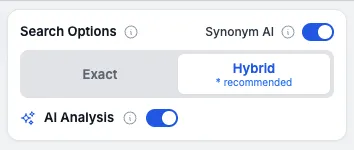
AI Analysis – Turn On Smarter Ranking
Global AI Search now includes a new toggle called AI Analysis.
Before your search runs and brings back the initial list of projects, you can flip AI Analysis on. It takes that list and re-sorts it based on what you actually meant by your search — not just the words that showed up.
What this means for you:
The projects that match your actual intent rise to the top
Less time scrolling past jobs that only share a word or two
Fewer “almost right” results that waste your time
Faster path from search to the work you can actually bid
Real example:
You search “water and sewer projects.”
The first list might include a bathroom drain fix, a new building that needs sewer lines, and a street project putting in new sewer pipe.
With AI Analysis turned on, the street pipe job rises to the top position.
You still see everything. You just get the most relevant work first when you want it. Less digging. Less stress. More of the right jobs in front of you.
Project AI – Now Out of Beta
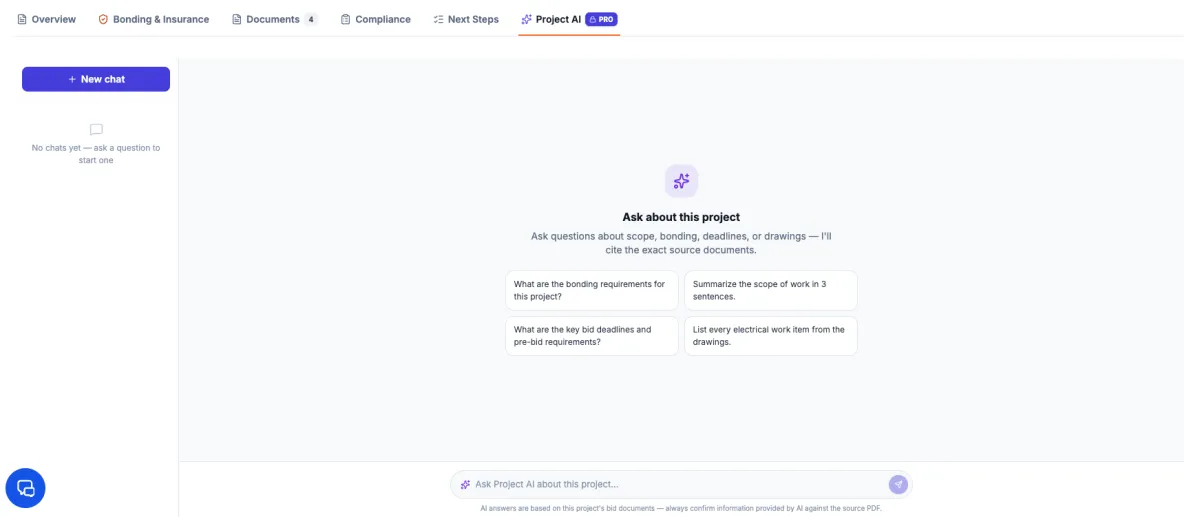
Every project detail page now has Project AI built in.
You’re looking at a specific job. Open the chat and ask it anything about that project. It has already read the plans and specs and acts as an expert on that one set of documents.
What this means for you:
Ask plain questions and get clear answers about the work
Have hard-to-read sections of the spec book explained in everyday language
Skip the legal jargon and get straight to what it actually means for your trade
Get the details you need without digging through hundreds of pages
Real example:
You’re on a project and want to know about the concrete specs, bonding requirements, or a particular section that looks confusing. Just ask. Project AI pulls the answer from that project’s documents and explains it in plain English so you can decide faster.
This is a Pro feature and is available on every project detail page.
Less time reading dense specs. Less stress trying to figure out what they really mean. More confidence when you decide to bid.
New Project Detail Page – Cleaner, Clearer, Easier to Use
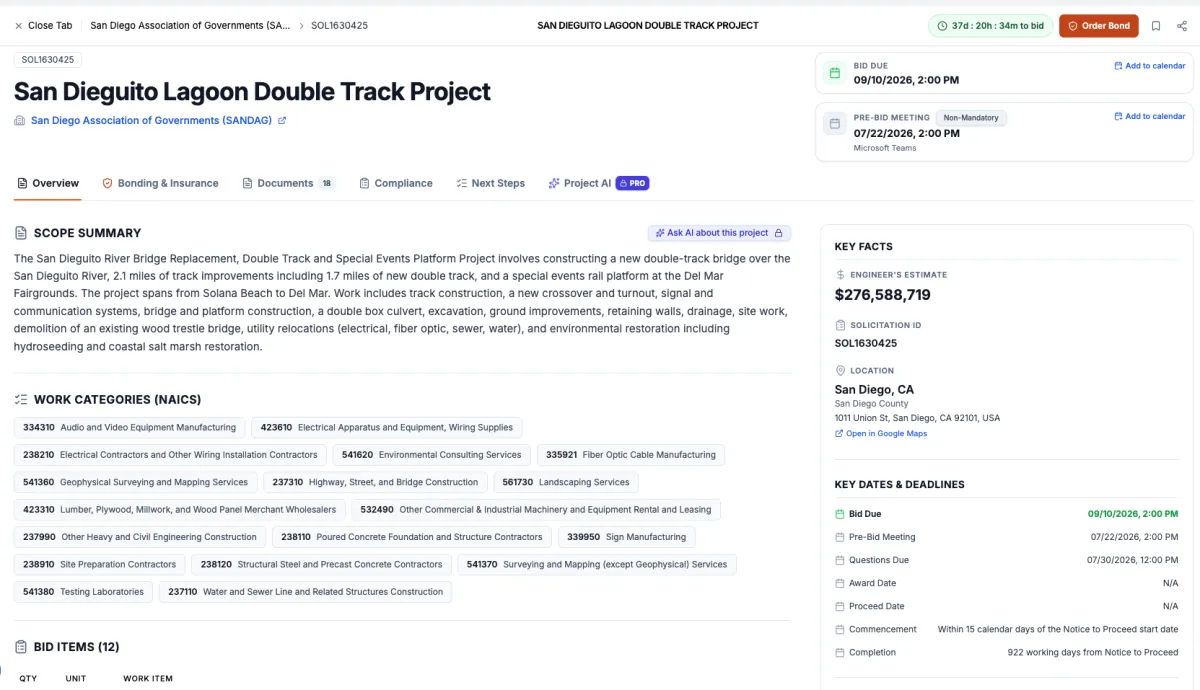
We completely redesigned the project detail page so you can find what you need without scrolling through one long wall of information.
Everything is now broken into clear tabs so the page feels organized instead of overwhelming.
Here’s what’s inside:
Overview – Project scope, key facts and dates, location, and bid items all in one clean view
Bonds & Insurance – A new bond card on projects that require bonding (linked to our partner PreCon Risk) plus more insurance details
Documents – Same familiar place to grab the plans and specs
Compliance – Brand new section that shows the project requirements, contractor requirements, and any third-party compliance needed for the job
Next Steps – Simple, practical steps on how to get started or bid this project, plus helpful reminders and an easy “Add to Calendar” button
Project AI – Chat directly with the documents for this specific project (the feature we covered earlier)
Extra touches that save time:
Countdown clock so you always know how much time is left
Add-to-calendar buttons for important dates
Close button on tabs for cleaner navigation
Overall smoother, faster movement around the page
The goal is simple: less hunting, less confusion, and a clearer picture of the job so you can decide faster whether it’s worth your time.
New Project Fields – More of the Details That Actually Matter
We’ve added a whole set of new fields to the project detail pages so you can see the important requirements, dates, and risk items without having to dig through the full documents.
Here’s what’s now available when the information is listed in the bid docs:
New Dates
Prebid meeting location — whether it’s in person (with the address) or online via Zoom or Google Meet
Questions due date — the deadline to submit all questions
Award date, proceed date, commencement date, and completion date — when available, these give you a clearer picture of when the work is expected to start and finish
Surety & Risk / Insurance
Bond delivery rules — whether the agency requires physical original bonds within a few days after the bid, or if electronic copies are accepted
Commercial umbrella policy required?
Additional insurance requirements when listed: workers’ compensation, pollution liability, sexual abuse liability, builders risk, and professional liability
Requirements
Subcontracting limit % — if there’s a cap on how much of the job can be subcontracted
Minimum qualifications — past job history or other experience requirements
Required registrations the contractor must have
Personnel screening requirements — license checks or background checks (especially for schools or sensitive public sites)
Retention percentage the agency will withhold
Warranty period — how long the contractor must guarantee and maintain the work
Compliance
Community Workforce Agreement — if one is required (these can add complexity)
Third-party hire requirements % — when a third-party manager, consultant, or other professional services are needed beyond the contractor’s normal role
Local hire target % — requirements to hire local workers or contractors beyond standard outreach programs
Agency preferences — anything the agency looks for that can improve a bid’s chances
Encroachment permit responsibility — whether the contractor or the agency is responsible for pulling the permits
All of these fields appear when the information is available in the project documents. The goal is simple: give you a faster, clearer view of the real requirements, timelines, and potential costs so you can decide quicker whether a job is a good fit.
If there are other fields you’d like us to extract to help you find the right bids faster, please let us know. Contact support at [email protected].
FAQ
What is AI Analysis and do I have to use it?
AI Analysis is a simple on/off toggle on Global AI Search. When turned on, it re-sorts the results so the projects that best match your real intent rise to the top. You can leave it off if you prefer the original list.
Is Project AI still in beta?
No. Project AI is now fully out of beta and available on every project detail page. It is a Pro feature.
What changed on the project detail page?
The page was completely redesigned. Information is now organized into clear tabs instead of one long list. You’ll also see a countdown clock, add-to-calendar buttons, better navigation, and new sections for Bonds & Insurance, Compliance, and Next Steps.
What new information will I see on projects?
When the details are available in the documents, you’ll now see extra dates (prebid location, questions due, award, proceed, commencement, completion), bond delivery rules, additional insurance requirements, subcontracting limits, minimum qualifications, required registrations, personnel screening, retention percentages, warranty periods, community workforce agreements, local hire targets, agency preferences, and more.
Do I need to do anything to get these updates?
No. Just log in and refresh your browser. Everything appears automatically.
Will these changes affect my saved projects or how I currently work?
No. Your saved projects, preferences, and existing workflows stay the same. These updates simply give you clearer information and faster tools.
I have ideas for other fields or improvements. How do I share them?
We’d love to hear them. Email [email protected] or use the live chat. Your feedback helps shape future updates.
COMPANY
SERVICES
UPDATES
Partner Companies
LEGAL

Phone: (951) 528-0528
© Copyright 2026. BidAmerica. All Rights Reserved.