BidAmerica 5.2
Faster Global AI Search and Cleaner Bid Tables
Global AI Search is now out of Beta with major speed improvements, plus a redesigned bid table that makes scanning opportunities easier and more efficient than ever.
Launched: Monday, July 13, 2026
What You Need to Know
BidAmerica 5.2 is rolling out now. All changes will appear automatically the next time you log in and refresh your browser. Here’s what to expect:
Global AI Search is now fully out of Beta with much faster performance. Use Hybrid mode as your default for the best balance, then switch to Exact or Meaning as needed. Searches combine automatically with your Work Area (by county) and additional filters like bid date, entry date, agency, or ZIP code radius.
The new View Excerpts helps you quickly verify results and jump directly to source pages in the bid documents — saving significant time when hunting for specific requirements.
Global AI Search is a Pro Feature and only available on the Pro Memberships.
Bid tables are now cleaner and easier to navigate with simplified columns, weekly grouping, color indicators, and quick date filter presets.
No account changes required — just log in and start using the improved tools.
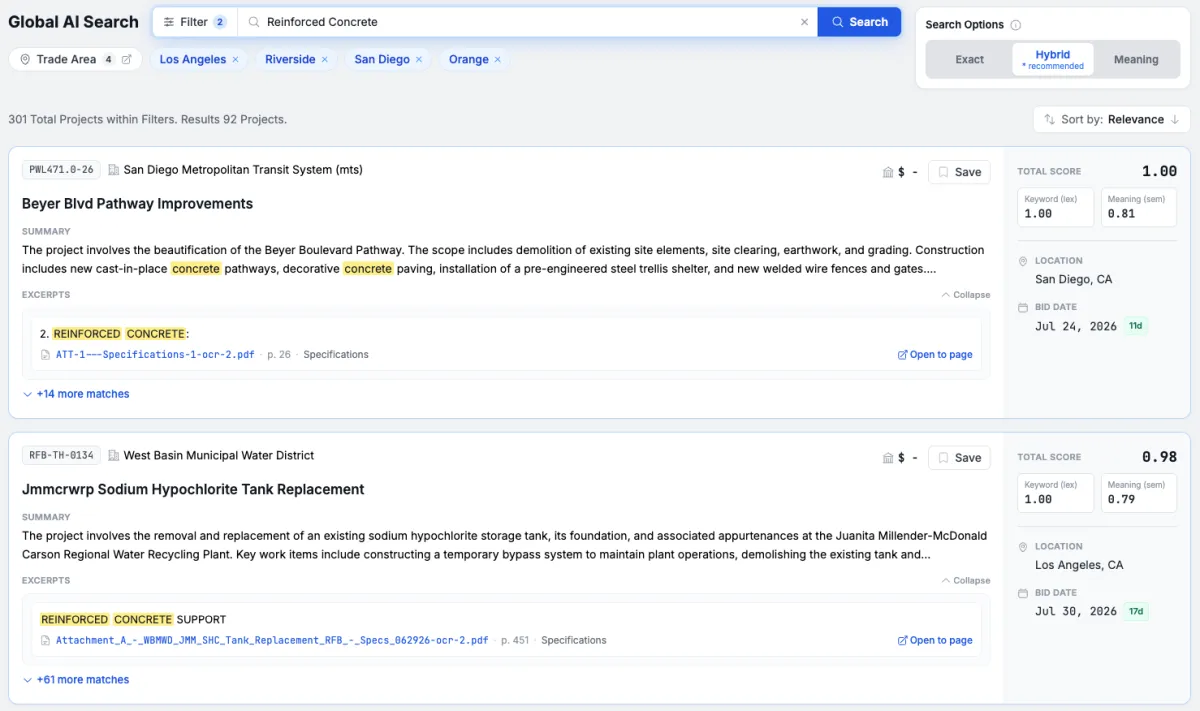
Global AI Search – Now Faster and Production-Ready
We’ve taken the high-quality Global AI Search you loved in Beta and made it dramatically faster. Previously, a search like “Striping” could take 1–2 minutes. It now typically returns results in about 10 seconds.
We’ve upgraded the system to a Hybrid search engine that combines a vectorized database with intelligent chunks pulled directly from the bid specifications. This delivers accurate, context-aware results much more quickly.
We’re excited to move this powerful tool out of Beta so it can become a daily part of your bidding process.
View More Excerpts Button
After running a search, click the new button to view all the document excerpts the query pulled. Each excerpt clearly shows where it matched or related to your query. You can click Open on any excerpt to jump straight to that exact page in the bid document. This is especially helpful for finding buried language in spec books and verifying relevance without digging through entire documents manually.
Search Modes – Choose How You Want to Search
You can now toggle between three search modes designed for real-world contractor needs:
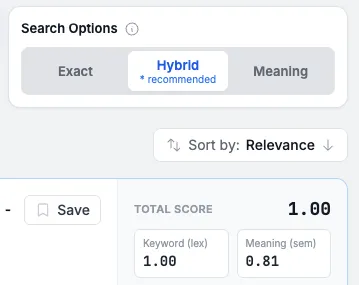
Exact (Lexical): Best when you need precise matches for part numbers, specific models, makes, or brands. It searches for exact wording in the documents.
Example: Searching for a specific “Model XYZ pump” or “Brand ABC epoxy.”
Meaning (Semantic): Ideal when you know the concept but not the exact terminology agencies might use — or when the same thing is described in multiple ways.
Example: Searching for a general idea like “traffic control” or “pavement markings” to find related work even if different phrasing appears in the specs.
Hybrid: Combines the strengths of both Exact and Meaning modes for balanced, high-quality results. This is the recommended starting point for most searches.
Redesigned Bid Tables – Cleaner and More Useful
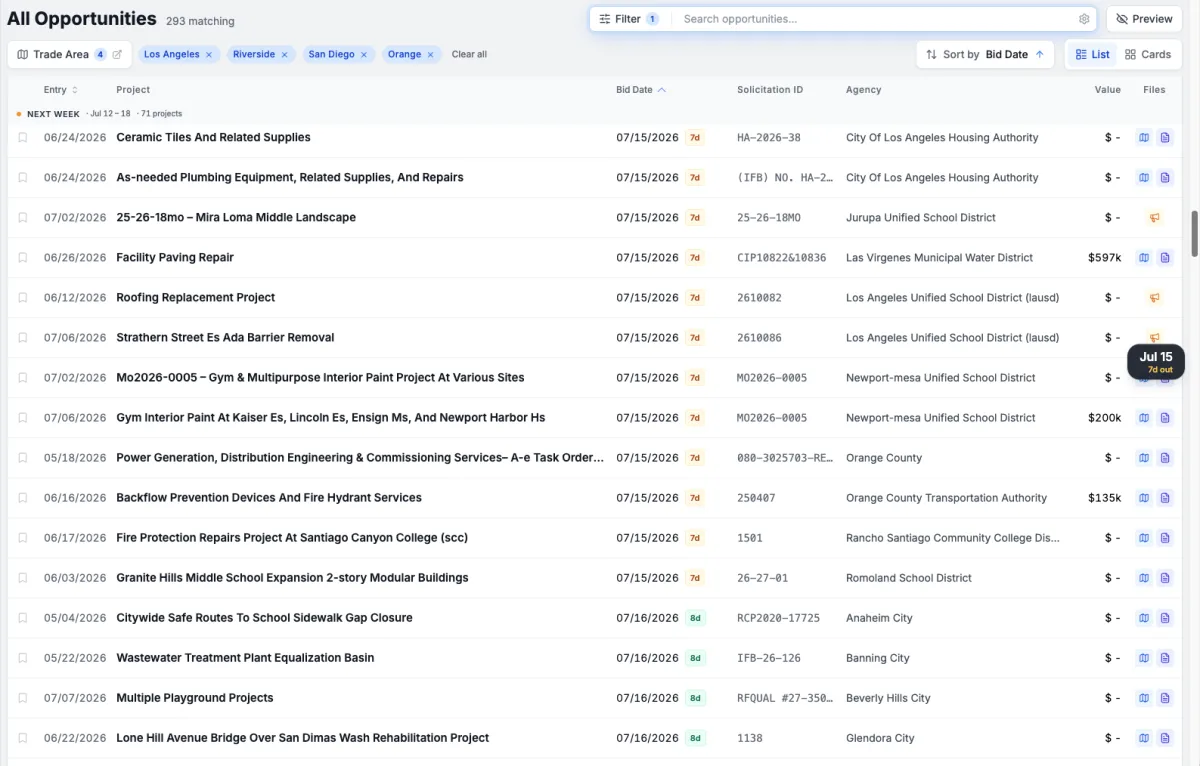
We’ve simplified the bid tables to reduce visual noise and help you scan opportunities faster.
Key Improvements:
Condensed columns using intuitive symbols and color coding (especially for urgency and bid dates) instead of multiple text-heavy columns.
Toggle between Card View and List View.
Weekly dividers make it easy to see projects grouped by week, spot the end of the current week, and quickly identify the start of the next — particularly useful when you need the weekend for estimates.
As you scroll, a helpful tip appears next to the scrollbar showing the Bid Date.
Days remaining displayed right next to each bid date.
Additional Filter Improvements
We’ve also updated the date filters. You can now quickly select presets like Today, Yesterday, Last 3 Days, Last 10 Days, or more instead of manually choosing a date range every time.
Upcoming Improvements
We’re already hard at work on the next set of improvements:
Redesigning the Project Detail Pages for a cleaner, more intuitive experience.
Redesigning Project AI to make chatting with specific projects even more powerful — with an AI that deeply understands the bid documents and plans.
If you have something you would like fixed, developed, or improved, please reach out to us at [email protected].
FAQ
How much faster is Global AI Search now?
Significantly faster. For example, a search that previously took 1–2 minutes (like “Striping”) now typically returns results in about 10 seconds.
What membership level is required to use the Global AI Search?
The Global AI Search feature is available only to Pro members and requires a Pro membership. To access this feature, please upgrade from the Plus membership.
What’s the best search mode to start with?
We recommend Hybrid for most users as it combines the precision of Exact searches with the broader understanding of Meaning searches. You can switch modes anytime depending on whether you’re looking for specific parts/brands or general concepts.
How does the Excerpt Explorer work?
After a search, click the Show Excerpts button to see all the relevant text excerpts from the bid documents. Each excerpt shows its relevance to your query, and you can click Open to jump directly to that page in the original document. This is a big time-saver for reviewing buried specs.
Can I still use my normal filters with Global AI Search?
Yes. Global AI Search automatically respects your Work Area (by county) and works with additional filters such as bid date, entry date, agency, ZIP code radius, and more.
What changed in the bid tables?
We reduced clutter by condensing columns with symbols and color coding, added weekly dividers for easier grouping, included days remaining next to bid dates, and added scroll tips. You can also toggle between Card and List views.
How do the new date filters work?
You can now quickly select common ranges with one click (Today, Yesterday, Last 3 Days, Last 10 Days, etc.) instead of always picking custom start and end dates.
Will these changes affect my saved projects or existing workflows?
No. All your saved projects, preferences, and current workflows remain the same. These updates simply make searching and browsing more efficient.
I have an idea for improving search, tables, or another part of the platform. How do I share it?
We’d love to hear it! Email us at [email protected] or use the live chat. Your feedback directly helps shape future updates.
COMPANY
SERVICES
UPDATES
Partner Companies
LEGAL
Phone: (951) 528-0528
© Copyright 2026. BidAmerica. All Rights Reserved.