BidAmerica 5.0
AI Search Across Every Project - Industry Leading
BidAmerica 5.0 brings the most significant leap forward in public works bidding technology — the launch of Global AI Search, now the industry’s leading search engine for construction bids. This new system searches across our entire project database, reading every word of every spec book and plan set, and delivering results based on meaning — not just keywords. Whether you're a general contractor, sub, or supplier, this gives you an unmatched edge in finding projects that match your exact work.
Launching: Soon
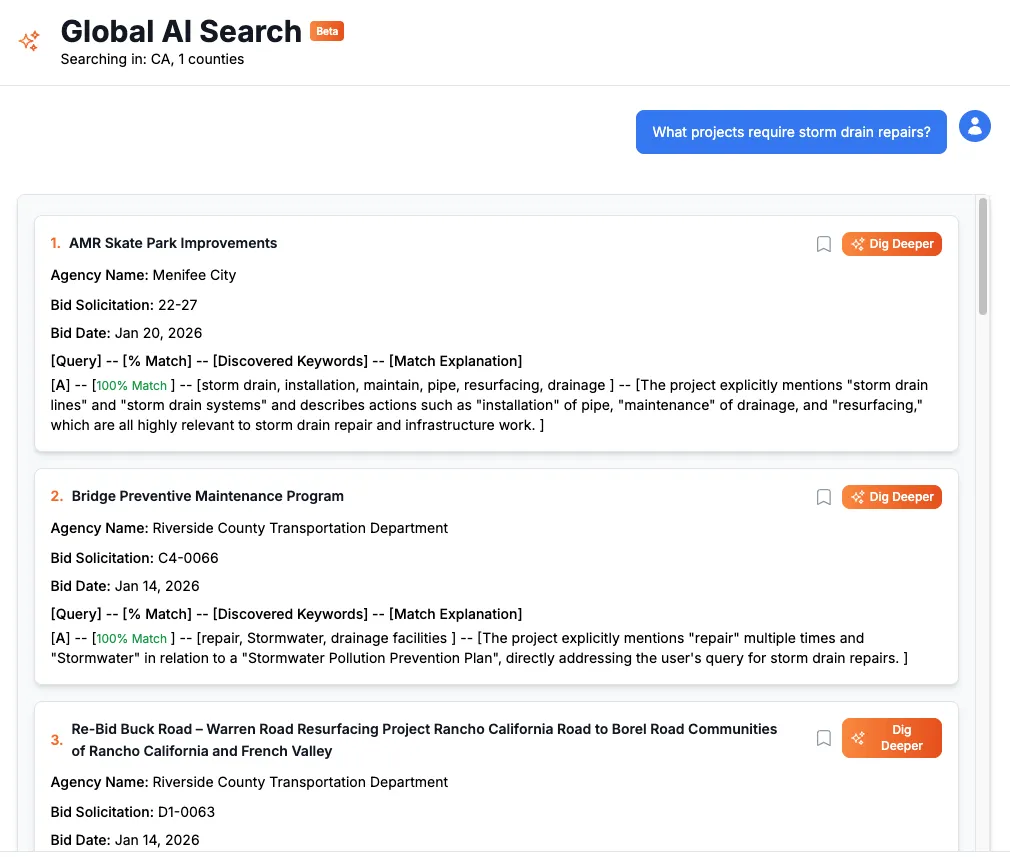
Global AI Search — The Industry’s Most Powerful Search Tool
BidAmerica 5.0 introduces Global AI Search, a cutting-edge feature designed to radically improve how contractors, trades, and suppliers discover relevant work. Instead of just scanning project titles or summaries, this system reads every word inside every spec book and plan set — and understands the context behind them.
This search is built to give real answers, not vague guesses. It works using a three-step process: semantic vector search, intelligent re-ranking, and final-layer AI scoring. The result is precise, transparent, and hyper-targeted results tailored to your trade, materials, or scope.
Here’s what makes it powerful:
Full Spec & Plan Search. AI reads every word of every spec book and plan set, including sections buried in technical divisions.
Understands Your Intent. Natural language queries like “metal roof replacement” or “non-slip epoxy coatings” return results with real context.
Finds Hidden Work. Detects scopes that aren’t mentioned in project titles — such as stormwater pollution prevention, asphalt overlay prep, ADA ramp upgrades, underground utilities, or structural retrofits.
Cross-Agency Understanding. AI interprets terminology across agencies, even when the same type of work is described differently. Whether it's “PVC membrane roofing,” “modified bitumen install,” or “cold-applied flashing,” our system understands these are all forms of roofing and indexes them accordingly — despite how differently they're written by each agency or consultant.
Ranks & Explains Matches. Each result includes a match score (%), relevant keywords found, and a summary of why it matched — with zero guessing.
What sets this tool apart is how flexible and useful it is across roles. Subcontractors can pinpoint exact matches for their scopes. Suppliers can track down projects calling for their specific parts or brands. General contractors can spot coordination-heavy work that’s buried in long-form technical specs.
Dedicated Agency Pages for Every Public Entity
BidAmerica 5.0 introduces a powerful new way to explore projects by agency. Our dedicated agency pages display all current and historical public works opportunities posted by each entity — making it easy to view everything one agency is bidding out in one place.
Whether you’re targeting local school districts, cities, or utility departments, this new layout helps you quickly assess an agency’s activity, project types, and timelines — all at a glance.
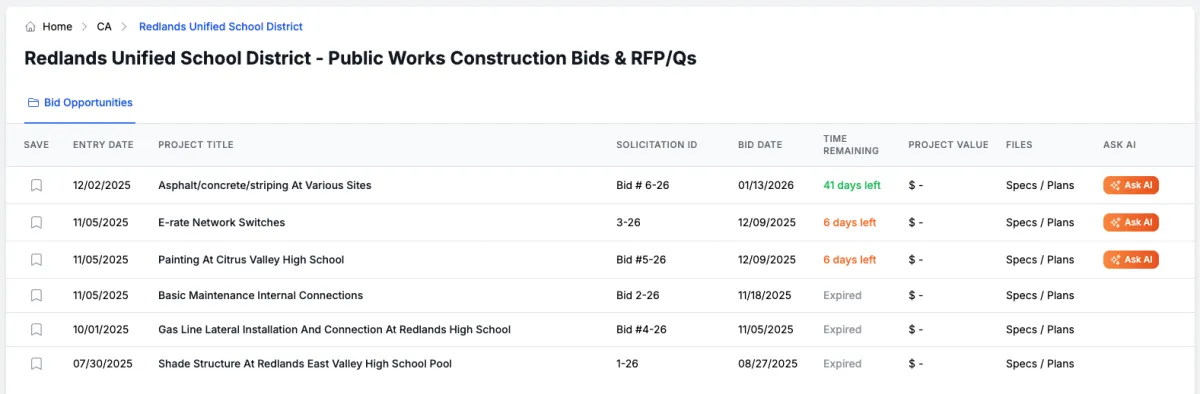
What you’ll see on each agency page:
Project List View with columns for entry date, project title, solicitation ID, bid date, and remaining time. Also including, project value and file type previews.
Ask AI button available for every project, so you can instantly chat with BidAmerica’s ProjectAI about any plans or specs.
Breadcrumb Navigation for easy reading or switching between agencies.
This is a major upgrade for contractors who focus on specific agencies or regions — and a faster way to track and respond to the opportunities that matter most.
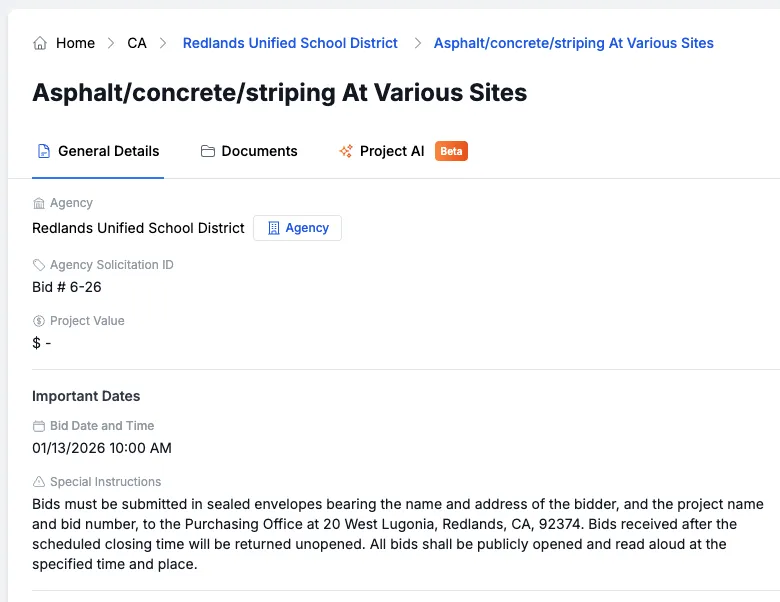
UI Improvements to the Project Detail Page
BidAmerica 5.0 brings a refreshed and more functional project detail view. We’ve fine-tuned the interface to help contractors navigate faster, stay oriented, and take action with fewer clicks.
What's New
New “Agency” Button. Quickly access the new dedicated agency page from the project detail view. The button opens in a new tab.
Breadcrumb Navigation. New breadcrumbs at the top of the page help users quickly see where they are and navigate between agency and project pages.
Quick Save Button. You can now save a project directly from the detail page, not just from the bid table.
Improved Layout Spacing. We've removed excessive horizontal gaps between sections and replaced them with subtle borders for a cleaner, more unified look.
Refined Tab Styling. The tab navigation now looks more like a true interface tab system, without the awkward spacing underneath.
Better Document Table. We removed bulky spacing, cleaned up the layout, and added a new column to display the file type — making it easier to scan and download the right documents.
These visual and functional enhancements make it easier to review, act, and explore projects without getting lost in clutter.
All Projects & URL Structure Changes
BidAmerica 5.0 brings cleaner, more intuitive URLs that better reflect how contractors navigate and share projects. We’ve restructured the format to include the project’s state, agency, and ID in a simple, human-readable format — matching the new breadcrumb trail you’ll see on each project page.
We’ve also updated how users access different types of searches. What was previously labeled “All Projects” has now been reorganized into two distinct options under a new section — making it easier to choose between our traditional filter-based tools and the new AI-powered search.
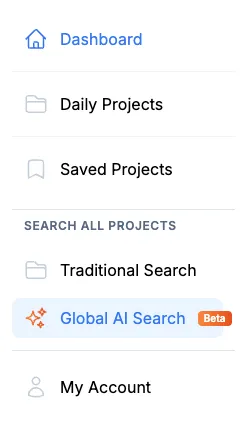
What's Changed
Cleaner URL Structure. Project URLs now follow the format /[state]/[agency-id]/[project-id], which mirrors the breadcrumb trail using agency and project names for clarity.
Renamed "All Projects" Section. The “All Projects” page is now called Traditional Search, reflecting its role as the original table-based project search tool.
Sidebar Navigation Update. In the sidebar, you’ll now see a new subheading: All Projects, which contains two options:
Traditional Search — our original filter/search table
Global AI Search — the new Advanced AI engine that searches across specs and plans
This small but important update brings clarity to your search experience and helps direct you to the right tool for every kind of work.
What You Need to Know
Starting soon, as part of the 5.0 update, most updates will appear automatically as you browse the site. There’s nothing you need to install or change. However, here are a few key things to be aware of:
Advanced AI Search is now available to all users on supported plans. To use it, simply visit the new AI Search section and enter a query. You can filter by location and explore matches across the entire spec and plan database.
You can now explore projects by agency using our dedicated Agency Pages. Click on an agency name or use the new “Agency” button on any project detail page to see all open bids from that entity.
Project detail pages have been redesigned with better navigation, a cleaner layout, and added features like breadcrumbs, direct save buttons, and improved document organization.
The original “All Projects” page has been renamed to Traditional Search, now grouped with Global AI Search under a new All Projects sidebar section.
FAQ
What is Advanced AI Search and how does it work?
Advanced AI Search lets you ask natural-language questions and instantly search across every spec book and plan in BidAmerica’s database. It uses semantic AI to understand your intent, reads every page of every document, and ranks results based on relevance — even if the work isn’t mentioned in the project title. Each match includes a confidence score, keywords found, and an explanation of why it matched.
Can I search only within my local area or trade?
Yes. You can pre-filter by state, county, or region, before searching so your matches are specific to where you work. It works for all trades, suppliers, and general contractors — including niche scopes like signage, grading, or waterproofing.
Where do I find the new Agency Pages?
Agency Pages are accessible by clicking the agency name on any project or by using the new “Agency” button on the project detail page. Each agency page shows all their open bids, making it easy to track local agencies or repeat clients.
What changed on the project detail page?
We made several UI improvements: breadcrumb navigation at the top, a new save button right on the detail view, better document layout (including file type columns), and more compact spacing between sections. URLs are now cleaner and include both the agency ID and project ID for easier linking.
Do I need to update anything on my account?
Nope — there are no required changes. Just log in and start exploring the new features. If you're on a supported plan, you’ll see the new AI tools and Agency Pages automatically. If you do not see any change, just simply refresh the browser page.
Is ProjectAI still available?
Yes! You’ll now see a new “Ask AI” column on both the project table and agency pages. Clicking this launches ProjectAI, which allows you to ask questions about the project’s documents and get instant answers with page references.
What happened to the “All Projects” page?
The “All Projects” page has been renamed to Traditional Search. This helps differentiate it from the new Global AI Search. Both are now grouped under a new sidebar category called All Projects, so you can choose your preferred way to explore bids: the traditional table view or our new AI-powered search experience.
COMPANY
SERVICES
UPDATES
Partner Companies
LEGAL
Phone: (951) 528-0528
© Copyright 2026. BidAmerica. All Rights Reserved.